Configuration
Settings & credits
Settings are per-brand — every tool reads them. Switch brands in the top bar and you are editing that brand's configuration. The credits card at the bottom is the one account-wide section.
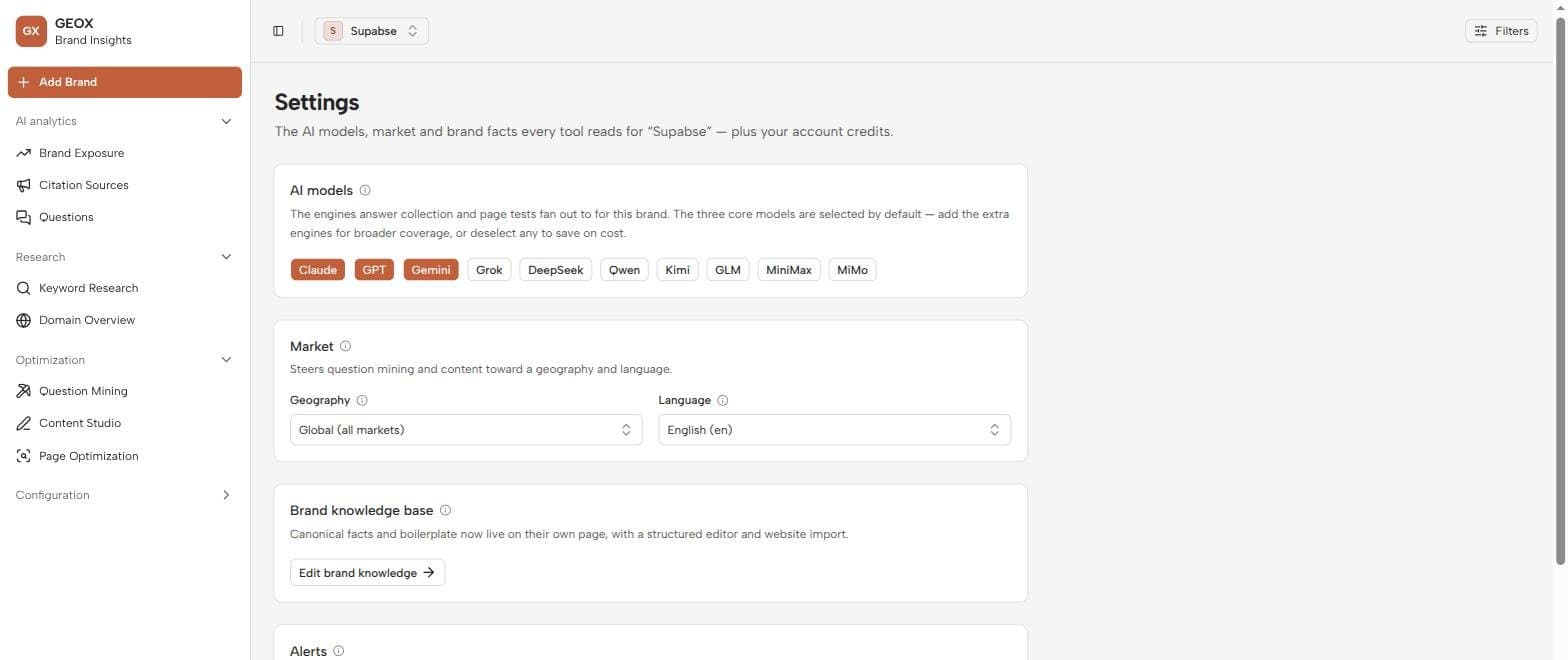
AI models
Toggle which of the ten engines this brand is measured against. The three core engines (Anthropic, OpenAI, Google) are on by default; the rest are opt-in. The choice cascades everywhere: collection runs, page tests, and the platform filter all use only the enabled engines.
Fewer engines = cheaper runs and tests. Enable a wide set for an occasional census; run your daily schedule on the few engines your buyers actually use.
Market
The brand’s geography and language. Question Mining mines in this market’s language, Content Studio drafts in it, and research tools use it as their default market. If you serve multiple markets, model them as separate brands so each gets clean, comparable numbers.
Brand knowledge base
A link to the Brand Knowledge editor — the canonical facts (pricing, features, positioning) that ground everything Content Studio writes. Covered in detail on the Alerts & brand knowledge page.
Alerts
A link to the Alerts page, where GEOX notifies you of significant changes it detects between runs. Also covered on the next page.
Credits
The account-wide card at the bottom:
- Balance and usage meter — the same meter shown at the bottom of the sidebar. Credits are consumed by anything that calls a live model or data provider: collection runs, mining, drafting, page tests, keyword and domain lookups.
- Recent activity — a collapsible ledger of what consumed credits, useful for finding what’s burning them.
- Buy credits — currently marked coming soon.
Don’t forget Save settings after making changes — engine and market edits apply from the next run onward.