AI analytics
Brand Exposure
Your home page and the answer to "how visible are we in AI answers right now?" — five sections, from headline KPIs down to per-question competitor gaps.
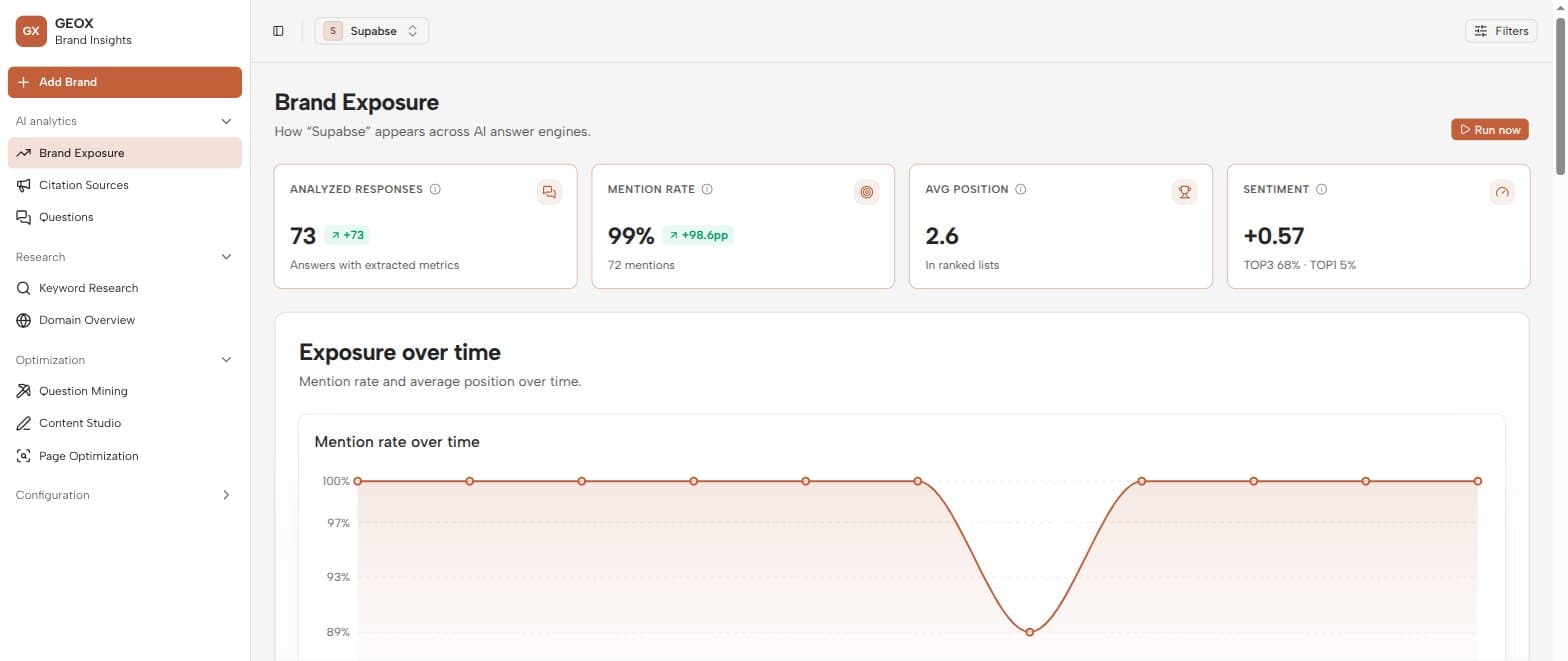
Headline KPIs
The top of the page shows four cards, each with a period-over-period trend against the previous window of the same length:
| KPI | What it tells you |
|---|---|
| Analyzed responses | How many answers back the numbers — small samples move around a lot. |
| Mention rate | The share of analyzed answers that name your brand or an alias. |
| Avg position | Your average 1-based rank when answers are ranked lists (with TOP1/TOP3 hints). |
| Sentiment | The average tone of your mentions, from −1.00 to +1.00. |
The Run now button in the header triggers a fresh collection for the current brand without leaving the page.
Exposure over time
A bucketed line chart of mention rate over time, paired with an exposure by period table. This is where a schedule pays off: regular runs make the periods comparable, so a content push or a competitor’s launch shows up as a visible bend in the line.
Platform performance
The same metrics broken down per AI engine — a mention-rate-by-platform chart and a breakdown table. Engines differ a lot: it’s normal to be strong on one and invisible on another. Use the platform filter in the top bar to drill any other section down to one engine.
Competitor analysis
Your mention share versus each tracked competitor — share of voice across all analyzed answers, as a chart and a table (your own row is marked “you”). Empty? Add competitors on the Brands page first.
Competitor gaps
The most actionable section: a per-question gap matrix — rows are your tracked questions, columns are competitors — showing exactly which questions competitors win while you’re absent. KPI cards summarize questions you lose, questions you win, and the widest gap.
Each losing row has two one-click actions:
- Generate content — opens the content generator inline, pre-targeted at that question.
- Close this gap — creates a ready-made task in your Tasks backlog.
A weekly routine that works
Check the gap matrix once a week, pick the highest-volume question you’re losing, generate a draft for it, publish, and re-test with Page Optimization. One gap at a time compounds quickly.