Optimization
Question Mining
You can only monitor the questions you thought to write down. Question Mining fixes the blind spot: it expands a seed topic into the questions buyers actually ask AI assistants.
Discover
Mine the questions buyers ask
Create
Citation-ready content
Test
Do your pages get cited?
Track
A prioritized backlog
Mining questions
- 1
Enter a seed keyword
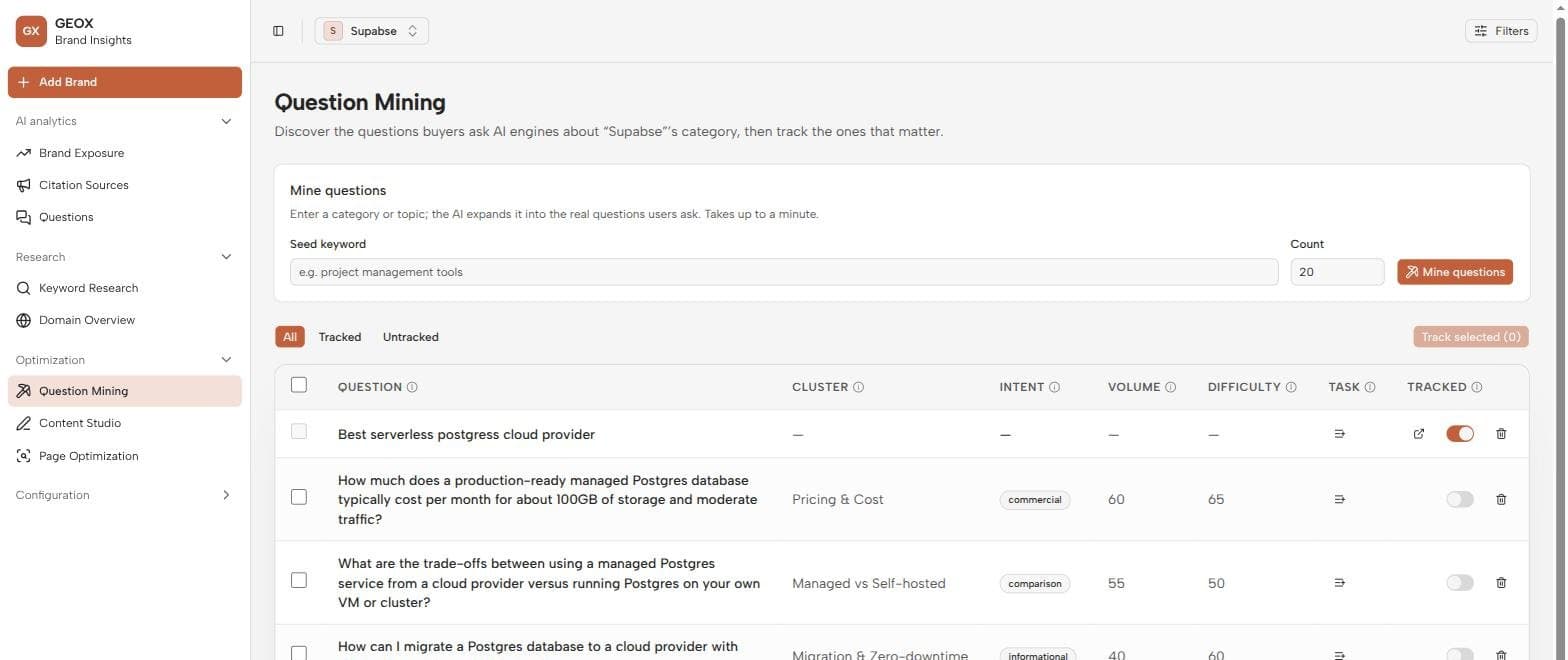
On Question Mining (sidebar → Optimization), enter a seed topic like “project management tools” and choose how many questions to generate (5–50).
- 2
Press “Mine questions”
The AI expands the seed into real buyer questions, clustered by subtopic. This is an LLM run, so it takes a moment and consumes credits.
- 3
Review the results
Each mined question comes annotated so you can triage quickly:
| Column | Meaning |
|---|---|
| Cluster | The subtopic the question belongs to (e.g. pricing, alternatives, how-to). |
| Intent | What the asker is trying to do — research, compare, buy… |
| Volume | AI-estimated popularity, for comparing questions against each other. |
| Difficulty | AI-estimated competitiveness of the topic. |
| Task | One-click 'create content answering this question' backlog entry. |
| Tracked | Toggle that promotes the question into your monitored set. |
Volume and difficulty are estimates
They’re AI judgments for relative comparison, not real search data. For real volume, cross-check against Keyword Research.
Tracking questions
Flip the Tracked switch on a good question (or select several and use Track selected) and it becomes a monitored question — collected on every run and schedule alongside the ones you wrote by hand, and visible on the Brands page. Untracking pauses monitoring but keeps history. The All / Tracked / Untracked tabs filter the table.
- Click through from a mined question to its monitored version to see its answer history.
- The market’s geography and language from Settings steer mining — a German-market brand mines German questions.
Where it fits
Mining is the entry point of the optimization loop: discover here, create in Content Studio, test with Page Optimization, track the work in Tasks. A monthly mining pass on your core topics keeps the question set honest as your market’s language shifts.